Showing posts with label windows 8. Show all posts

Fully Unlocked FIFA 14 Apk + Data Is Here [No Root, No Lucky Patcher Needed]

EA Sport Android FIFA 14 has been the best Android football HD game so far due to its HD graphics, realness, offline feature to enjoy manager mode and other features to mention. But ever since EA Sport introduced FIFA 15 & 16 which is an Online gameplay came into existence and you will agree with me its not everyone that likes online gameplay that requires internet connection, unlocking FIFA 14 the Lucky patcher and Freedom method has been a very difficult task thereby making lovers of FIFA 14 to search for reliable methods to unlock it.


Previously, we shared fully unlocked FIFA 14 v1.2.9  apk and obb data which needs no root or whatsoever to enjoy game full features. So far, many downloaded and gave it a trial which was a success and brought happiness and smile. But that moded version did not support all os and sometimes it came up with black screen.

Here again, we are sharing with you fully unlocked fifa 14 v1.3.6 Mod apk + obb data, this mod version 1.3.6 is smooth and clean with no black screen all you have to do is download, install and place obb and data file in its right place, launch game and enjoy without any issues.
FEEL THE PASSION:

Featuring 33 leagues, over 600 licensed teams, and more than 16,000 players. From the English Premier League and La Liga to the German Bundesliga and beyond. March toward glory in 34 authentic stadiums. Plus, for the first time on mobile, listen to commentaries in English, French, German, Italian and Spanish! To download commentaries enter the CUSTOMIZE menu, then click the AUDIO tile for options.


MATCH DAY MADNESS

EA SPORTS™ Football Club Match Day lets you follow the heartbeat of your favorite club. Play along with real-world fixtures from top leagues. Every injury, suspension, and change in team form is reflected in-game – keeping you connected wherever you are!

ROCK OUT – FIFA STYLE

Featuring a killer soundtrack with the hottest artists, from Empire of the Sun to Vampire Weekend. It’s an epic playlist only FIFA can bring you!


What's In Fifa 14 v1.3.6 Mod apk + obb data?

  • Fully unlocked
  • No black screen
  • No delay
  • English commentary

HOW TO INSTALL

1.  Download fully unlocked FIFA 14 v1.3.6 Mod apk.
2.  Download Mod data/ obb files and extract.
3.  Now move extracted data file folder (com.ea.game.fifa14_row) to internal storage/ Android/  Data

4.  Also move extracted obb files folder (com.ea.game.fifa14_row) to internal storage/ Android/ Obb

5.  Turn on and turn off your Wi-Fi which is always needed to run FIFA 14.
6.  Finally, launch Android FIFA 14 and enjoy full features including games of the week


Like i said, rooting and using lucky patcher is not needed, just download the given apk and needed files and you are good to go.

NOTE: Downloading apk from another source to use with given data & obb file from this blog will not unlock game. Download all needed files from this blog. Thanks


DOWNLOAD:

Fully Unlocked FIFA 14 v1.3.6 Mod Apk [16MB]
Unlocked Data file - including english commentary [465MB]
Fifa 14 v1.3.6 Obb file [1.1GB]

source: techvillaz.com
Read More »

How To Set Up Wireless Ad Hoc Network Connection In Windows 8


Windows8AdHoc
The procedure outlined here makes use of Windows’ native Network Shell utility, deploying the wlan command within the utility to enable a hosted network that will, in turn, serve as your ad hoc connection. If all this sounds daunting, fret not, for the actual procedure is fairly easy. Follow the steps outlined below, and you should be good to go.

Procedure
Step 1: Launch an elevated command prompt under Windows 8 (one with administrator privileges).
Step 2: Run the following command to verify that your network interface supports
netsh wlan show drivers


Hosted Network support

If Hosted network supported says Yes, you’re all set. Otherwise, you need to upgrade your hardware, if the software update doesn’t fix it.
Step 3: Now, set up the ad hoc wireless network using this command. Replace the parts in markup tags with your own choices
netsh wlan set hostednetwork mode=allow ssid=<enter_network_name_here> key=<enter_password_here>
image
Step 4: Until now, your hosted network has been created. Now, you need to start it. Use the command below:
netsh wlan start hostednetwork
image
Step 5: You’re all set, with just one thing remaining. If it’s not already enabled, you need to allow Internet Connection Sharing (ICS) for your currently-active internet connection. Simply head over to Network & Sharing Center, and in the properties for the current internet connection, enable ICS. Make sure to select the ad hoc connection under Home networking connection.
Allow ICS
Now you can connect any device to the internet using the ad hoc wireless network with internet connection sharing that you just created on your Windows 8 PC.
Networks
Read More »

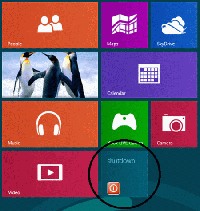
How to Add a Shutdown Button to Windows 8 Start Screen

Basically windows 8 is a new windows with new features. most people that are new to windows find it hard to shutdown saying they do not know where the shutdown buttons is!In today's tutorial, we will be showing you how to add shutdown buttons to windows 8 start screen

How to Add a Shutdown Button to Windows 8 Start Screen

(1) First of all launch Notepad. This can be done by pressing Win Key+R which will call up the run dialogue box and then type notepad and hit enter. Or you can even search for notepad from the start screen and then launch it.
- See more at: http://www.alltechbuzz.net/2012/12/add-shutdown-reboot-buttons-windows-8.html#sthash.6JgoeaUg.dpuf
1. First of all launch Notepad. This can be done by pressing Win Key+W. then click on Apps and then type NOTEPAD in the search box
2. Then copy and paste the below given text to notepad.

    set WshShell = WScript.CreateObject("WScript.Shell")
    strStartMenu = WshShell.SpecialFolders("StartMenu")
    set oShellLink = WshShell.CreateShortcut(strStartMenu & "\Shutdown.lnk")
    oShellLink.TargetPath = "%systemroot%\System32\shutdown.exe"
    oShellLink.Arguments = "-s -t 0"
    oShellLink.WindowStyle = 1
    oShellLink.IconLocation = "%systemroot%\System32\shell32.dll,27"
    oShellLink.Description = "Shutdown Computer (Power Off)"
    oShellLink.WorkingDirectory = "%systemroot%\System32\"
    oShellLink.Save
    Set oShellLink = Nothing
    set oShellLink = WshShell.CreateShortcut(strStartMenu & "\Log Off.lnk")
    oShellLink.TargetPath = "%systemroot%\System32\shutdown.exe"
    oShellLink.Arguments = "-l"
    oShellLink.WindowStyle = 1
    oShellLink.IconLocation = "%systemroot%\System32\shell32.dll,44"
    oShellLink.Description = "Log Off (Switch User)"
    oShellLink.WorkingDirectory = "%systemroot%\System32\"
    oShellLink.Save
    Set oShellLink = Nothing
    set oShellLink = WshShell.CreateShortcut(strStartMenu & "\Restart.lnk")
    oShellLink.TargetPath = "%systemroot%\System32\shutdown.exe"
    oShellLink.Arguments = "-r -t 0"
    oShellLink.WindowStyle = 1
    oShellLink.IconLocation = "%systemroot%\System32\shell32.dll,176"
    oShellLink.Description = "Restart Computer (Reboot)"
    oShellLink.WorkingDirectory = "%systemroot%\System32\"
    oShellLink.Save
    Set oShellLink = Nothing
    Wscript.Echo "Created Shutdown, Restart and Log Off buttons"


(3) Now click on the Save As option in the File menu and in the File name enter Shutdown.vbs Don't forget to enter .vbs

(4) Next in the file type, select All files and click on the Save option.

(5) Then switch to the location where you saved the file and run the file once. The file will open for a second and then will automatically disappear.

(6) Now switch to the Start Screen and Voilla. You will see that the Tiles of Shutdown, Restart and Log Off have been automatically pinned there and now with one click you can Shutdown or restart your system.


THATS ALL...
Then copy and paste the below given text to notepad. - See more at: http://www.alltechbuzz.net/2012/12/add-shutdown-reboot-buttons-windows-8.html#sthash.6JgoeaUg.dpu

Read More »

How To Download Or Upgrade My windows 7 To Window8

"I want to upgrade from Windows 7 to Windows 8. How can I do this while keeping all of my files in-tact? Is it possible to retain all of my applications and user settings, too?" That is a question one of my readers of extremetipz asked me.Today i want how you can go about upgrading your windows 7 to windows.its an easy task which you dont need an engineer but firstly you need to check the compability

HOW TO CHECK IF YOUR SYSTEM IS WINDOWS 8 COMPATIBLE

The first thing you'll want to do is to check your PC to see if it can run Windows 8 properly. The Windows 8 system requirements are:
  • Processor: 1GHz CPU or faster
  • RAM: 1GB (32-bit) or 2GB (64-bit)
  • Disk space: 16GB (32-bit) or 20GB (64-bit)
  • Graphics: DirectX 9-capable video card with WDDM driver
In other to use the new windows 8 store,your system resolution should be of at least 1024x768 pixels and in other to snap a photo you should have a resolution of at least 1,366x768 pixels.

HOW TO UPGRADE FROM WINDOWS 7 TO WINDOWS 8

microsoft are doing an offer that says " buy a windows 7 pc and get windows 8 pro for just £14.99,your upgrade price is £14.99 until 31 January 2013.But if you dont want to buy that offer,you can get a windows 8 pro for £34.5

Gather all your drivers so that you will be install it after the upgrade is completed because windows 8 might not have all the drivers required by your system especially when its very old.

BACK UP YOUR FILES

back up your files should incase something goes wrong!get the original copy of your windows 8 pro @ microsoft.com
Read More »

TOP 10 WEBSITES TO PLAY FREE ONLINE GAMES.

Are you tired of downloading games of large size like 1gb? or are you tired of playing free online games that are not interesting?Now i want to show you TOP TEN SITES FOR FREE ONLINE GAMES.


TOP TEN SITES FOR FREE ONLINE GAMES.


1.freeonlinegames.com
2.www.addictinggames.com
3.www.miniclip.com/
4.www.bgames.com
5.www.agame.com
6.www.dailygames.com/
7.www.mousebreaker.com
8.www.gamenode.com/
9.www.king.com
10.www.zapak.com        

THAT ALL 
HELPS IT  
Read More »

WINDOWS 8 TRANSFORMATION PACK 4.0 DOWNLOAD FOR FREE

Now i can say it is a good news for the fans of windows.Now you can now use windows 8 on your windows xp without changing your windows xp operating system.This transformation pack works with both windows xp,windows vista and windows 7  and its makes your system look like windows 8 though its has not been released

FEATURES OF WINDOWS 8 TRANSFORMATION PACK

• Seamless installation and un-installation giving users safe transformation
• Easily configurable in single click with intelligence Metro UI design 
• Designed for all editions of Windows XP/Vista/7 including Server Editions
• Genuine Windows 8 system resources with Metro touches
• Smart system files updating with auto-repair and Windows Update friendly
• Fresh start for Vista/Seven Transformation Pack users with updated Windows 8 themes and resources
• UxStyle memory patching
• Windows 8 themes, wallpaper and logon screen
• UserTile with current user auto-configured on login
• Metro UI desktop emulation with pre- configured gadgets
• Aero’s auto-colorization feature

CHANGES IN THIS RELEASE OF TRANSFORMATION PACK 4.0

  • Added Charms Bar as alternatives for those who can't get full Immersive UI to work
  • Added new Segoe family fonts from Windows 8 Consumer Preview with Windows Vista/7 font update support
  • Improved system files modification framework (More secure and safe to handle)
  • Fixed disabling system files modification that won't work on installation
  • Fixed explorer not restoring after choosing to cancel restart during configuration
  • Fixed permission problems in some programs that perform changes in Program Files
  • Fixed system files modification bug in Program Files on x64 platform
  • Fixed unchecking large icon doesn't restore icon size bug
  • Fixed uninstallation script that removes legacy theme registry
  • Updated component UI font to Tahoma and info font to Segoe UI
  • Updated default Metro Desktop UI option to Immersive UI with Charms Bar as default option
  • Updated default pictures of guest and user to Windows 8 Consumer Preview ones
  • Updated Metro Inspirat Windows XP visual style to version 3.0
  • Updated Newgen to version 8.0
  • Updated Newgen UI to match with Windows 8 Consumer Preview
  • Updated system files resources
  • |-logon screen
  • |-shell branding and logo
  • |-shell icons
  • |-start button/orb
  • |-system tray icons
  • Updated TrueTransparency skin based on Windows 8 Consumer Preview default color
  • Updated wallpapers to Windows 8 Consumer Preview ones
  • Unchecked 'Aero's auto-colorization (Vista/7) only' feature to get Windows 8's default colorization

 DOWNLOAD HERE

New Changes: 1.Welcome screen Changed 2.Folder and Windows 3.Windows 7 start menu 4.Windows 7 task bar,But windows logo is replaced 5.Navigation's and arrows are changed 6. Transparent Windows 7.True Transparent ,ViGlance ,ViStart are added 8.Download Windows changed 9.Windows 7 icon pack 10.Speed reduced 11.Font and style changed 12.Minimize,Maximize,Close menu changed . Change is not good. We can't see that menus.

Copied From: http://ashutoshthehacker.blogspot.com/2011/10/windows-8-transformation-pack-for.html
Content Copyrighted to THE NEXT GENERATION


Read More »

HOW TO TRANSFORM YOUR WINDOWS XP,7 TO MAC OS X MOUNTAIN LION

If you have been following this blog, i will br showing  you how to customize my windows 7 :), from changing boot screen to logon screen, i covered many more customization tutorials.
Later,i will share a tutorial on how to transform windows 7 to look like android with a skin pack, however if somehow you still aren't satisfied with the look of your computer screen there's another way to go about it by transforming your windows to look like Mac OS, my laptop currently looks like a windows 8, you might even get confused about it being a window 8.

Transform Windows 7 & Win8 and XP to Mac OS X Mountain Lion
Download :
7X64: Download
7X86: Download
Win8: Download
Support:
Windows 7 , Windows 7 SP1 , Windows 8 , Windows XP - [X86_X64] - [All Language] - [All Version]
For windows 7 starter and home basic first need to patch and Unlock Aero effect from here
Note : Skin Packs installer have easy and safe install option , Please unistall old or other version of skin packs before install new version. Before install close all runnig program , after finish restart your system.

PLEASE MAKE SURE YOU SHARE AND TWEET THIS POSTS TO YOUR FRIENDS...

For you not to miss my posts:

                                                           LIKE US ON FACEBOOK


Read More »

HOW TO TRANSFORM YOUR WINDOWS XP,7 TO WINDOWS 8


If you have been following this blog, i will br showing  you how to customize my windows 7 :), from changing boot screen to logon screen, i covered many more customization tutorials.
Later,i will share a tutorial on how to transform windows 7 to look like android with a skin pack, however if somehow you still aren't satisfied with the look of your computer screen there's another way to go about it by transforming your windows to look like Mac OS, my laptop currently looks like a windows 8, you might even get confused about it being a window 8.

TO download the skinpack to transform your windows 7 or xp into windows 8, follow the links below

Transform Windows 7 and XP to Windows 8

Download offline installer for skinpacks:


Support:

Windows 7 , Windows 7 SP1 , Windows XP - [X86_X64] - [All Language] - [All Version]
For windows 7 starter and home basic first need to patch and Unlock Aero effect from here
Note : Skin Packs installer have easy and safe install option , Please unistall old or other version of skin packs before install new version. Before install close all runnig program , after finish restart your system.

Once you have successfully installed the skin pack you should reboot your system for the changes to take effect.
After rebooting you should see lots of new and exciting changes, with new features, your windows 7 now officially looks like a windows 8 with rocketsdock, xlaunchpad and so much more.
 
PLEASE MAKE SURE YOU SHARE AND TWEET THIS POSTS TO YOUR FRIENDS...

For you not to miss my posts:

                                                           LIKE US ON FACEBOOK

Read More »